Limit orders in prediction markets explained
A limit order lets you choose the price at which you are willing to trade an event contract. Instead of accepting the best price currently available, you set your price and wait for another trader to match it.
Learn
By Ekaterina Drozdovica

In prediction markets prices can move quickly when new information comes in. A limit order gives you more control over your price, but it may fill only partly or not at all.
This guide focuses on limit orders in prediction-market trading. Stocks and foreign exchange platforms also use limit orders, and although the asset or instrument being traded is different, the feature works in much the same way.
This article is for informational purposes only and should not be construed as financial or investment advice. Past performance does not guarantee future results.
What is a limit order in prediction markets?
A limit order is an instruction to buy or sell an event contract at a set price or better. A buy limit sets the highest price you will pay. A sell limit sets the lowest price you will accept.
For example, a market may ask whether Dallas will win an upcoming football game. If Yes is trading at 48 cents, you could place a buy limit order at 44 cents. Your order can fill only at 44 cents or lower.
The 48-cent market price means the event contract trades at a 48% market-implied chance of the event happening. The final result still depends on the event and the settlement rules.
How do limit orders work for event contracts?
When you submit a limit order, it joins the other open orders in the market. It waits until another trader is willing to trade at your price or a better one.
For a buy order, “better” means a lower price. A buy limit of 44 cents means you will pay no more than 44 cents per contract. For a sell order, “better” means a higher price. A sell limit of 60 cents means you will accept no less than 60 cents.
The limit price is a boundary. It does not guarantee that the order will fill, and it does not mean every contract must execute at exactly that price.
Several things affect whether an order fills:
- Available prices. Your order needs a trader on the other side who will accept your price.
- Available quantity. There may be enough contracts to fill a small order but not a larger one.
- Order priority. Better-priced orders normally fill first. If two orders have the same price, the earlier order will generally have priority, subject to the platform’s rules.
What is a partial fill?
A partial fill happens when only some of the requested contracts are available at your limit price or better.
Suppose you place an order for 50 Yes contracts at 44 cents. If only 20 are available, those 20 may fill while the remaining 30 stay open. The rest can fill later if more contracts become available at 44 cents or lower.
What happens to an open limit order?
A resting order may stay open until it fully fills, and is canceled manually by a trader. It may also be canceled automatically when the prediction market closes or resolves. Traders cannot define a custom expiry of a limit order.
Platforms may set aside the amount needed to cover an open order, including applicable fees. This is often called a reserved balance. The money remains in the account but may not be available for another trade while the order is open.
Limit order vs. market order
A market order focuses on speed. It tries to trade at the best prices currently available, but the final price can change while the order is being filled.
A limit order focuses on price control. It will not trade outside your limit, but there is a greater chance that some or all of the order will remain unfilled.
With a market order, the main benefit is faster execution. The trade-off is less control over the final price, particularly when only a small number of contracts are available.
With a limit order, the main benefit is price control. The trade-off is a greater chance of a partial fill or no fill. This matters in prediction markets because prices can change quickly around news and live events.
Limit order examples
Here are three simple examples of how limit orders can work with prediction-market event contracts.
Example one: buying below the current price
An economics contract asks whether unemployment will be above a stated rate. Yes is trading at 52 cents, but you only want to buy at 48 cents or lower.
You place a buy limit order at 48 cents. If the market falls to your price and enough contracts are available, the order may fill. If the price stays above 48 cents, it will remain open or expire under the order settings.
Example two: receiving a partial fill
A football contract asks whether a team will win a game. You place a limit order for 100 Yes contracts at 55 cents.
Only 40 contracts are available at 55 cents, so 40 fill and 60 remain open. The outstanding 60 can fill later only if more contracts become available at 55 cents or lower.
Example three: selling at a set price
You hold Yes contracts in a politics prediction market and want to sell them only if the price reaches 70 cents. You place a sell limit order at 70 cents.
The order may execute at 70 cents or higher. If the highest available buying price stays below 70 cents, it will not fill.
How to place a limit order on OG.com
OG.com is introducing limit orders, giving you more control over the price at which you trade.
Unlike an immediate market order, which must execute immediately or be canceled, a limit order remains open until filled or cancelled by you. This means you can set your preferred price and let the order sit in the market without having to monitor prices constantly.
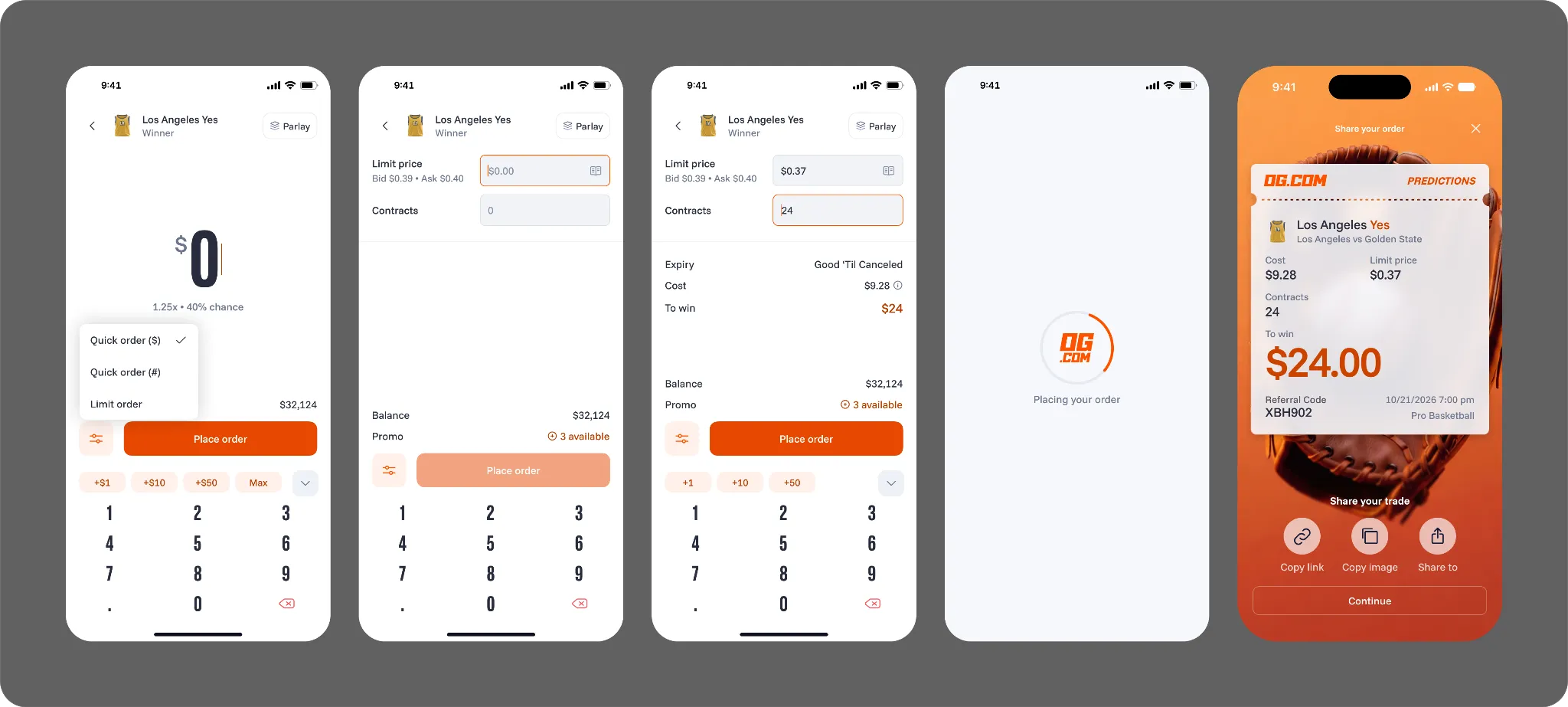
To place a limit order:
- Choose a market and outcome. Open the prediction market you want to trade and select an outcome.
- Select “Limit order.” Rather than “quick order”, choose the “limit order” option when placing your trade
- Enter your limit price and quantity. Set the number of event contracts you want to trade and the maximum price you’re willing to pay when buying, or the minimum price you’re willing to accept when selling.
- Review your order. Confirm the price, quantity, estimated cost, applicable fees, and the market’s settlement rules.
- Place your order. Once submitted, your order will remain open until it is filled or canceled manually by you. It may be filled in full, or remain unfilled if the market does not reach your chosen price.
Ready to trade on your terms?
You can view, monitor, or cancel resting limit orders from your open-orders page. The fee for a limit order is 1.75%, charged only when your order is accepted and the trade is completed.
FAQs about limit orders
What is the difference between a market order and a limit order?
A market order (quick order on OG.com) aims to trade immediately at the best available price. A limit order lets you set your price, but it may fill only partly or not at all.
Can you cancel a limit order?
Yes. You can cancel an unfilled or partially filled limit order from your open-orders page. Contracts that have already filled cannot be canceled as part of the open order.
Do limit orders expire on OG.com?
Traders cannot set a custom expiry for an OG.com limit order. It remains open until it fills or is canceled, and may be canceled automatically when the market closes or resolves.
What fees apply to limit orders on OG.com?
OG.com charges a 1.75% fee when a limit order is accepted and the trade is completed. An order that remains unfilled is not charged a trading fee.
Important Information: Prediction is an event contract that is a derivatives product offered by North American Derivatives Exchange, Inc. (NADEX), a CFTC-regulated exchange, which does business under the brand OG Prediction Markets (OG.com) and uses OG.com technology.
Trading on OG.com involves risk and may not be appropriate for all. By trading you risk losing your cost to enter any transaction, including fees. You should carefully consider whether trading on OG.com is appropriate for you in light of your investment experience and financial resources. Any trading decisions you make are solely your responsibility and at your own risk.